
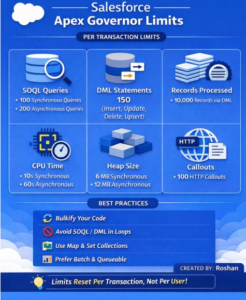
Writer saw this post on LinkedIn by Roshan Something and decided to write blog post article regards to How to keep Work Orders, Service Appointments, and van‑stock flows fast, reliable, and limit‑safe—with practical Apex patterns and examples.
Why Governor Limits Matter (Especially in Field Service)
Salesforce runs on multi‑tenant infrastructure, so every line of code you ship shares compute, database, and network with other orgs. To keep the playing field fair, Salesforce enforces Apex governor limits per transaction. If your code exceeds a limit, Salesforce throws a hard exception and rolls the whole thing back. That’s painful when a dispatcher is bulk‑rescheduling appointments or a plumber is tapping “Complete” on the mobile app at a customer site.
Typical Plumbing Use Cases + Where Limits Bite
1) Creating Work Orders & Service Appointments from Bookings
Scenario: A booking integration drops 500 new jobs for next week. You need to create Work Orders, Service Appointments, and initial Work Order Line Items (WOLIs) with van‑stock placeholders.
Where limits hit:
- 500+ bookings = risk of SOQL 100 and DML 150 if you query/insert per record. [developer….sforce.com]
- CPU spikes if you run heavy logic in triggers.
Pattern: Bulkified trigger + handler + one SOQL per object + one DML per type.
// Trigger: WorkOrder from Booking__c (bulk-safe)trigger BookingTrigger on Booking__c (after insert) {if (Trigger.isAfter && Trigger.isInsert) {BookingHandler.createFieldServiceRecords(Trigger.new);}}
public class BookingHandler {public static void createFieldServiceRecords(List<Booking__c> newBookings) {// Collect foreign keys onceSet<Id> accountIds = new Set<Id>();for (Booking__c b : newBookings) if (b.Account__c != null) accountIds.add(b.Account__c);
// Single query for all accountsMap<Id, Account> accounts = new Map<Id, Account>([SELECT Id, Name, BillingAddress FROM Account WHERE Id IN :accountIds]);
// Build work orders & appointments in-memoryList<WorkOrder> wos = new List<WorkOrder>();List<ServiceAppointment> sas = new List<ServiceAppointment>();
for (Booking__c b : newBookings) {WorkOrder wo = new WorkOrder(AccountId = b.Account__c,Subject = ‘Plumbing Job: ‘ + b.Job_Type__c,Status = ‘New’);wos.add(wo);}insert wos; // 1 DML
// Link Service Appointments to Work Ordersfor (Integer i = 0; i < newBookings.size(); i++) {ServiceAppointment sa = new ServiceAppointment(ParentRecordId = wos[i].Id,EarliestStartTime = newBookings[i].Preferred_Start__c,DueDate = newBookings[i].Preferred_End__c,Status = ‘Scheduled’);sas.add(sa);}insert sas; // 1 DML}}
Why this works: one query per object, batched inserts—stays inside SOQL/DML limits even when hundreds of bookings arrive together.
2) Technician Completes Appointment → Update Van Stock & Billing Lines
Scenario: When a plumber taps “Complete” in the mobile app, you deduct parts from van inventory, create used‑parts WOLIs, and push a callout to an accounting system for the invoice draft.
Where limits hit:
- Busy crews might complete hundreds of appointments in a short window; a mass update can blow past 10,000 DML rows in one transaction (e.g., many WOLIs)
- If you call the accounting API per line item, you risk 100 callouts per transaction. [developer….sforce.com
- Large JSON payloads and inline PDF rendering can trip heap size limits
Pattern: Do the minimum synchronously in the trigger; defer the heavy work to Queueables/Batch.
// Trigger: ServiceAppointment after update → enqueue async processingtrigger ServiceAppointmentTrigger on ServiceAppointment (after update) {List<Id> toProcess = new List<Id>();for (ServiceAppointment sa : Trigger.new) {ServiceAppointment oldSa = Trigger.oldMap.get(sa.Id);if (oldSa.Status != ‘Completed’ && sa.Status == ‘Completed’) {toProcess.add(sa.Id);}}if (!toProcess.isEmpty()) {System.enqueueJob(new PostCompletionProcessor(toProcess));}}
public class PostCompletionProcessor implements Queueable, Database.AllowsCallouts {private List<Id> saIds;public PostCompletionProcessor(List<Id> saIds){ this.saIds = saIds; }
public void execute(QueueableContext ctx) {// 1) Query all consumption records onceList<Consumed_Part__c> consumptions = [SELECT Id, Service_Appointment__c, Product__c, Quantity__cFROM Consumed_Part__c WHERE Service_Appointment__c IN :saIds];// 2) Aggregate by Product for bulk inventory updatesMap<Id, Decimal> productQty = new Map<Id, Decimal>();for (Consumed_Part__c c : consumptions) {productQty.put(c.Product__c, (productQty.get(c.Product__c) == null ? 0 : productQty.get(c.Product__c)) + c.Quantity__c);}// 3) Build minimal Inventory__c updatesList<Inventory__c> updates = new List<Inventory__c>();for (Id prodId : productQty.keySet()) {updates.add(new Inventory__c(Product__c = prodId, QuantityDelta__c = -productQty.get(prodId)));}// Batch DML into chunks under 10k rowswhile (!updates.isEmpty()) {List<Inventory__c> chunk = updates.removeRange(0, Math.min(2000, updates.size()));upsert chunk; // 1 DML per chunk, rows << 10,000}
// 4) One callout per appointment (not per line)for (Id saId : saIds) {// Build compact payload to keep heap smallHttpRequest req = new HttpRequest();req.setEndpoint(‘callout:Accounting/invoices/draft’); // Named Credentialreq.setMethod(‘POST’);req.setTimeout(30000); // keep under cumulative 120sreq.setBody(JSON.serialize(new Map<String, Object>{‘serviceAppointmentId’ => saId}));new Http().send(req);}}}
- Queueable moves the heavy lifting out of the synchronous path, giving you 60s CPU and 12 MB heap instead of 10s/6 MB. [developer….sforce.com]
- Using Named Credentials simplifies and secures auth; batch callouts ensure you never exceed 100 callouts/transaction. [developer….sforce.com]
- Chunked DML keeps you under the 10,000 DML rows ceiling. [developer….sforce.com]
3) Address Geocoding & Route Optimization
Scenario: Nightly job geocodes new service locations and pre‑computes drive times for tomorrow’s routes.
Where limits hit:
- Geocoding APIs are callout‑heavy; a naive loop can exceed 100 callouts fast. [developer….sforce.com]
Pattern: Batch Apex with small execute() scopes; limit callouts and use retry queues.
global class GeocodeBatch implements Database.Batchable<SObject>, Database.AllowsCallouts {global Database.QueryLocator start(Database.BatchableContext bc) {return Database.getQueryLocator([SELECT Id, Street__c, City__c, Postcode__c FROM Service_Location__c WHERE Geocoded__c = false]);}global void execute(Database.BatchableContext bc, List<Service_Location__c> scope) {// Scope size set to ~20 to keep callouts << 100for (Service_Location__c loc : scope) {// call geocoding service once per record}update scope;}global void finish(Database.BatchableContext bc) {}}
4) Generating Service Reports (PDFs) and Uploading Evidence Photos
Where limits hit:
- Rendering PDFs or handling many images in memory can breach heap size (6/12 MB). [help.salesforce.com]
Patterns:
- Stream or chunk large files; avoid holding giant base64 strings in variables. [help.salesforce.com]
- Prefer ContentVersion inserts with modest blob sizes per transaction and offload heavy transformations to asynchronous jobs. (Heap best‑practice guidance applies.)
Field Service–Specific Considerations
- Mass maintenance plan generation can create thousands of Work Orders at once (practical cap ~2,600 per generation). Align your trigger/flow logic so it doesn’t do heavy work per record; push noncritical work to async. [help.salesforce.com]
- Flow vs. Apex: Flows follow the same per‑transaction limits; complex “After Save” flows that loop over related records can trip SOQL/DML/CPU ceilings. Keep flows thin and call invocable Apex for bulk, optimized operations.
Practical Guardrails & Patterns
- Never SOQL/DML in loops; aggregate with Maps/Sets, then act once.
This single change avoids 90% of “Too many SOQL 101” and DML 151 errors. [developer….sforce.com] - Use the Limits class defensively to short‑circuit before you blow a limit:
if (Limits.getDmlRows() + pendingRows > Limits.getLimitDmlRows()) {// Defer the rest via Queueable/Platform Event}
3) Choose the right async tool:
-
- Queueable — chainable, callouts allowed, good for post‑trigger processing.
- Batch — massive volumes, fresh limits per execute scope.
- Scheduled — off‑peak, predictable windows.
All provide more CPU and heap headroom than synchronous. [developer….sforce.com]
-
- Consolidate (one callout per appointment, not per line).
- Keep each transaction below 100 callouts and 120s cumulative timeout. [developer….sforce.com]
-
- Query only fields you need; stream or chunk large payloads.
- Prefer smaller JSON objects and avoid class‑level caches for big collections. [help.salesforce.com]
Wrap‑Up
Apex governor limits aren’t there to slow you down—they guide you toward scalable designs. In Field Service for plumbing, the winning approach is consistent:
- Bulkify everything,
- Keep transactions small,
- Push heavy lifting to asynchronous Apex, and
- Be intentional about callouts and heap usage.
If you follow the patterns above, you’ll keep dispatchers happy and techs productive—even on your busiest days.